Build software around your business. Keep it running—and evolving.
Handrail turns the workflow, report, portal, or system your business needs into a production application. We deliver the initial build, operate it through Handrail, and keep improving it as your business changes—all in one visible workspace.
Most software makes your team bend around the tool.
Teams fall back to spreadsheets, duplicate entry, missing reports, and disconnected systems because off-the-shelf products were built for an average business.
Custom software should fit the way the work really happens.
Handrail delivers the first production system, operates it through an ongoing plan, and keeps evolving it as the business changes.
The work stays visible from build through operation.
Priorities, estimates, approvals, testing, releases, hosting context, and plan usage stay connected while your data and business outputs remain yours.
One place to see what is being built and why.
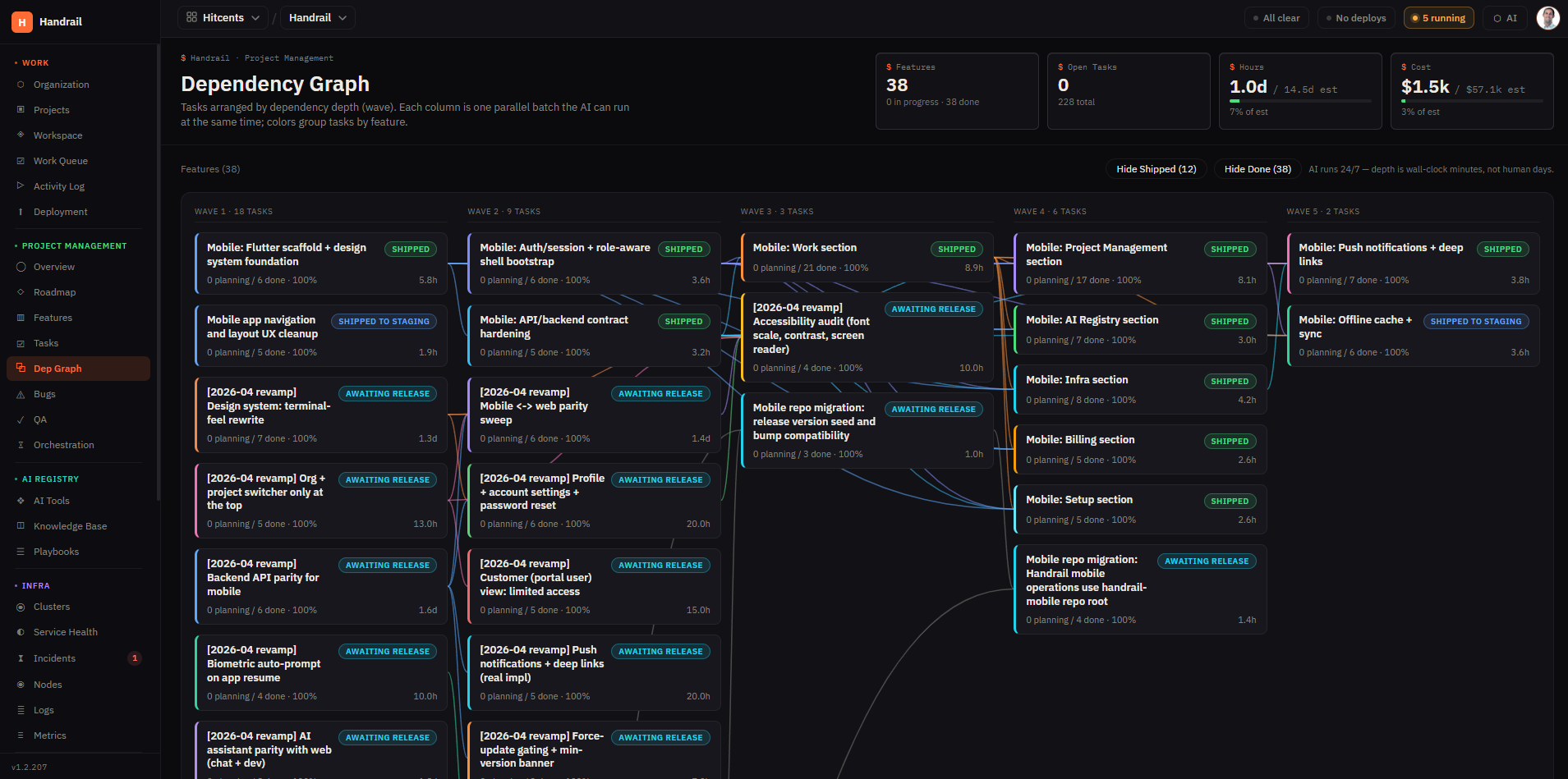
Custom software can feel abstract until you can see the work. Handrail is the shared workspace where requests, priorities, estimates, tasks, approvals, testing, releases, and cost context stay connected in plain view.
Problems become requests.
Every ask is captured with the business reason, owner, target outcome, estimate, and current status.
Priorities stay honest.
Roadmap views show what is active, what is waiting, what changed, and what is being prepared next.
Review before build.
Estimate, scope, dependency, and release decisions are visible so delivery choices are made deliberately.
Checks stay attached.
Builds, tests, review environments, and live releases connect back to the requests they support.
Time is traceable.
Time and cost visibility are tied to delivery progress so budget conversations stay grounded in work.
History stays connected.
Released changes, decisions, and supporting records stay connected to the application, roadmap, and environments.
From request to usable software, the path stays legible.
A request does not disappear into a ticket queue. You can see what was asked for, what it will take, who needs to review it, what is being built, what is ready to try, what is live for your team, and how capacity is being used.
Workflow problems enter with business context, priority, dependencies, and success criteria.
The delivery team breaks requests into tasks, estimates, delivery waves, and review points.
Customers approve scope, estimates, priorities, review results, and live release decisions.
Implementation moves through human architecture, engineering, testing, and release ownership.
Test status, review links, environments, and blockers stay attached to the work item.
Time entries, capacity use, release records, and next priorities stay visible as work ships.
Approvals are explicit.
You can require sign-off before scope advances, before build time is spent, before review closes, or before a change goes live.
Testing is connected to the roadmap.
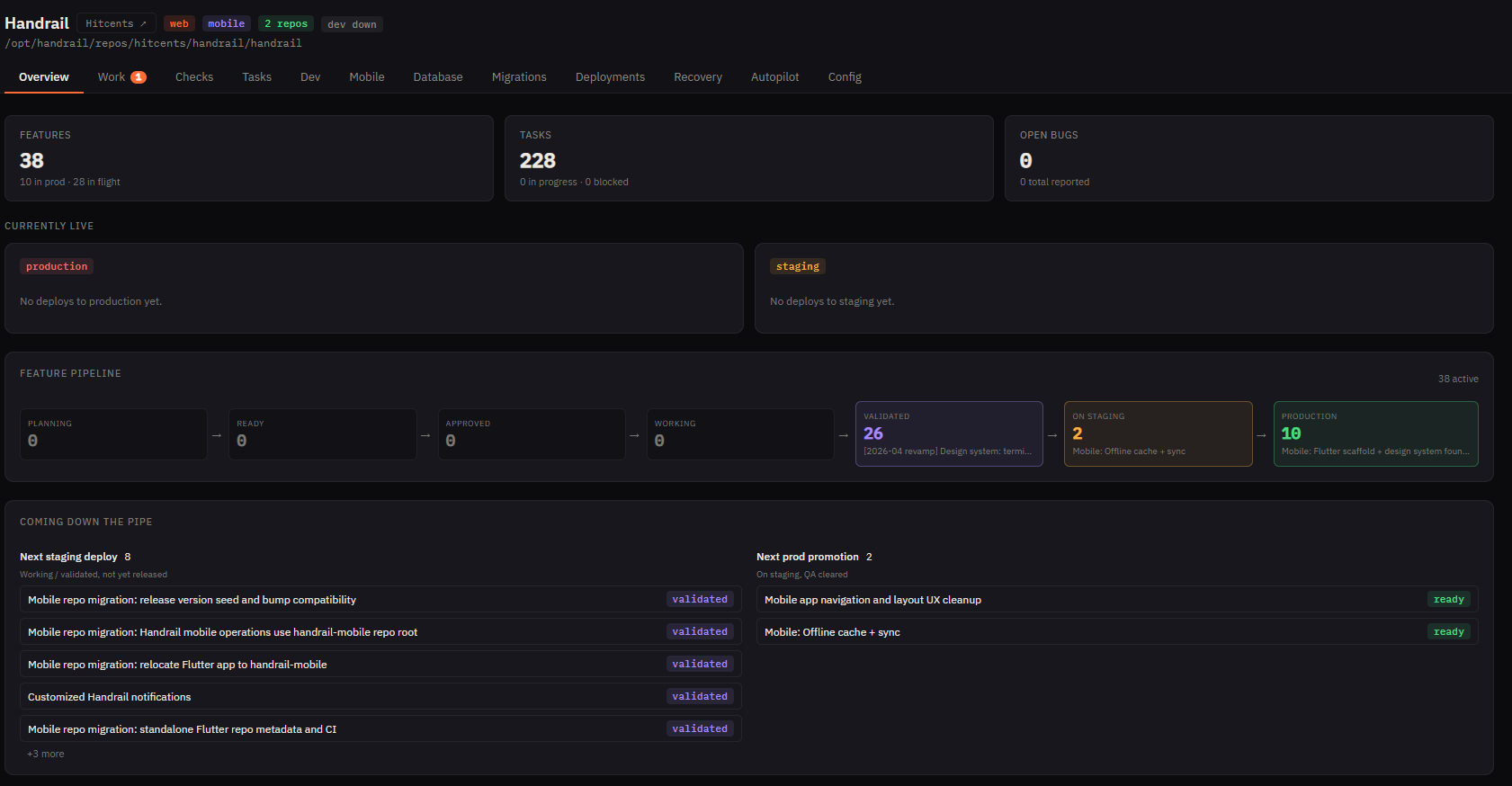
Checks, failed builds, review status, and live releases connect back to the feature or task that caused them.
Review states are visible.
Work that is ready to try and work that is already live are shown in the delivery record so non-technical stakeholders can see what changed.
Usage has work context.
Change activity and service usage are tied to visible work, which makes conversations about trade-offs, pace, and next priorities concrete.
You do not need to know the software answer yet.
Most teams start with a messy business problem, not a product spec. Bring the workflow, report, approval path, customer experience, or system gap. We will help decide whether custom software is the right answer and what the first useful version should be.
I need software that fits how we work.
See how one painful workflow can become scoped, approved, shipped custom software.
HandrailI need to trust how this gets built.
Understand the workspace for requests, approvals, testing, reviews, releases, operations, and plan usage.
PlanningI need help defining the first version.
Use the optional planning path when priorities, constraints, data, or the first build need definition.
RolloutI need a practical start.
Start focused, prove the rhythm, and expand once stakeholders trust the new workflow.
PricingI need to understand cost.
Review how the initial build, ongoing service plan, application needs, and complexity shape a quote.
ContactI am ready to talk.
Request a practical conversation about the workflow to improve and what should happen next.
Next stepBring the messy process. We will help shape the first useful version.
The fit conversation turns interest into a practical next step: what hurts now, who needs the tool, what success looks like, and whether a demo, scoped first queue, or deeper discovery is the right move.
Stay in control without becoming the project manager.
The normal worry is fair: custom software can become expensive and unclear if no one can see the work. Handrail keeps the plan, decisions, costs, and review steps visible while the delivery team handles the day-to-day build.
Approve work before build time is spent.
Review requests, estimates, dependencies, and release decisions before they advance. This gives founders, operators, and regulated teams a precise way to steer scope without chasing status across tools.
Let the team build, keep the record.
Let the delivery team move approved work forward while you review summaries of what shipped, what needs input, where time is going, and what comes next. The live workspace remains available whenever you need detail.
Launch the first system. Keep making it better.
Handrail combines a clearly scoped initial build with an ongoing service plan for platform access, production operations, support, and continuous software evolution. You get a working system now and a practical way to improve it over time.
Scope
The workflow is broken into buildable pieces with estimates, acceptance criteria, and dependencies before code is written.
Human · PlanningApprove
You review the plan. Approve item by item or in a batch summary, depending on how closely you want to steer.
You · Detailed or summaryBuild and test
Engineering, testing, and review work move through Handrail so status, blockers, and decisions stay attached to the request.
Delivery team · Visible workRelease
Finished work gets a release record that explains what changed, what was checked, and what is now live for your team.
Human · Test and releaseStart with the system your business needs now.
Agree on the first production system, then let Handrail carry it from scoped work through build, testing, review, and launch.
Keep the live application covered.
The ongoing plan keeps platform access, production hosting, backups, monitoring, support, security, and operations in one relationship.
Change the software as the business changes.
Add workflows, reports, permissions, integrations, and other improvements without treating every new business need as a new software purchase.
For complex work, we can map the foundation first.
Some teams are ready to build. Others need to untangle priorities, data, integrations, constraints, and stakeholder needs first. Our optional planning path turns a complex operation into an agreed initial scope before the build begins.
The foundation needs definition.
Planning fits when leaders know custom software may be needed, but priorities, system boundaries, integrations, data needs, or success targets still need definition.
Map the first buildable path.
The work clarifies business goals, roles, risks, dependencies, launch expectations, and the first outcomes people can review.
Create the first buildable scope.
The work hands off a cleaner first queue, decision record, and delivery assumptions inside Handrail so the initial build starts with less ambiguity.
From curiosity to a first useful release.
We learn the operation, agree on the first production system, build and launch it, then carry it into an ongoing plan for hosting, support, monitoring, and continuous improvement.
Find the process causing drag.
Identify the workflow, reporting gap, integration pain, manual step, or internal tool problem worth improving first.
Build the agreed first system.
Set up the workspace and foundation, build the agreed application, test it, review it with your team, and prepare it for production.
Launch with the ongoing plan in place.
Bring the live application onto Handrail with hosting, backups, monitoring, support, security, and operating visibility.
Keep improving after launch.
Use the ongoing plan to refine the application, add connections, improve reports, reduce manual work, and plan the next changes.
What we need from you
A business owner who can explain the workflow and make priority decisions.
Access to the people, systems, data, and tools needed for the first workflow.
A regular review rhythm for scope, test results, releases, adoption feedback, and trade-offs.
One build. One ongoing plan.
The initial build is priced around the system you need first. After launch, an ongoing service plan keeps it available, supported, secure, and able to evolve. We recommend the right fit after learning what the application must do.
Fixed initial build
A commercial price for the agreed first production system and its initial scope, shaped by size, complexity, and business value.
Ongoing service plan
Platform access, production hosting, backups, monitoring, support, security, operations, and continuous software evolution.
Usage that fits the application
The right plan reflects users, change activity, infrastructure, AI usage, monitoring, recovery, and security needs.
Human engineering when needed
Plans can include reserved human engineering, with additional expertise available for work that needs hands-on attention.
A focused production application.
A practical fit for a focused internal application or workflow with standard monitoring and support needs.
A broader operational system.
A fit for multiple workflows or integrations that need more change activity, advanced monitoring, and human engineering support.
A business-critical operating platform.
A fit for complex, high-use applications that need proactive operations, deeper controls, and tailored service levels.
What shapes the quote
Initial scope, application complexity, users, integrations, change volume, infrastructure, monitoring, recovery, security, and human engineering needs shape the recommended build and plan.
Discuss your build and planSee how one painful workflow moves.
Requests, estimates, approvals, implementation, testing, and releases stay connected in one visible delivery record.
Request
Capture the painful workflow and the outcome the team needs.
Estimate
Break the request into buildable work with scope and estimates.
Approval
Review priorities and approve the work before implementation.
Implementation
Move approved work forward with its status and decisions attached.
Testing
Connect checks and acceptance results to the work being reviewed.
Release
Record what shipped and keep the next request in the same rhythm.
Your data and business outputs stay yours. The delivery record keeps decisions visible while Handrail operates and evolves the application.
Talk through one workflowStart with one painful workflow.
Talk us through one workflow that is slow, manual, disconnected, or hard to see. Together, we will determine the most useful next step.
- Quick checkFit call
Confirm whether custom software is a practical answer for this workflow.
- See the modelHandrail demo
See how priorities, build work, reviews, and releases stay visible.
- Start focusedFocused first build
Shape one useful workflow improvement before expanding the system.
- Clarify firstDeeper discovery
Map scope, systems, constraints, and sequencing when the path is not clear yet.